Address
304 North Cardinal St.
Dorchester Center, MA 02124
Work Hours
Monday to Friday: 7AM - 7PM
Weekend: 10AM - 5PM
Address
304 North Cardinal St.
Dorchester Center, MA 02124
Work Hours
Monday to Friday: 7AM - 7PM
Weekend: 10AM - 5PM

 Byadmin
Access control is a modern security management system that allows or restricts people to enter or leave a specific area within a specific authorization range through technical means, such as computer technology, network communication technology, and embedded systems, to realize the functions of access control, time and attendance, entry and exit record querying, and security precautions.Access control is widely used in various places, such as governmental organizations, financial institutions, schools, hospitals, residential communities, shopping malls, and hotels. It can realize the unified management of various entrances and exits and improve security and management efficiency.
Improve security
Through the access control system, the entry and exit of personnel can be controlled, and unauthorized personnel can be prevented from entering important areas, thus improving security.
Improve management efficiency
Access control system can realize automated management, reduce manual intervention, and improve management efficiency. For example, through an access control system, remote door opening can be realized, automatic recording of access records, and other functions.
Real-time monitoring
Through the access control system, real-time monitoring can be realized, timely detection of abnormalities can be performed, and appropriate measures can be taken. For example, if a user attempts to destroy the access control system or forcibly enter a specific area, the system immediately issues an alarm and issues a notification to the relevant personnel.
Expandability
Access control systems are usually modular and can be expanded or reduced to meet specific requirements. With the continuous development of technology, access control systems can undergo continuous upgrading and optimization.
Variety of verification methods
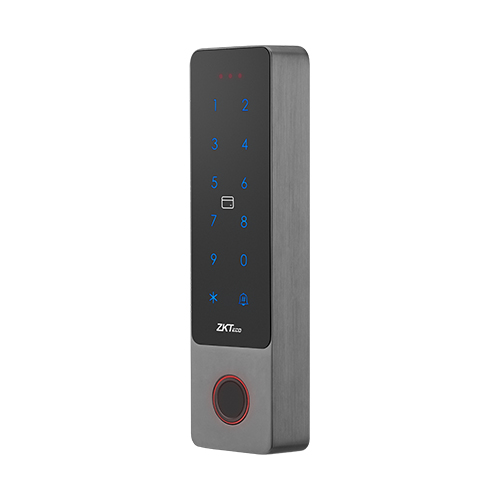
Access control can be verified by a variety of authorizations such as IC/ID cards, digital passwords, and biometrics, which provides better convenience for personnel under the premise of ensuring security.
Mandatory access control
The security model regulates access rights through a central authority based on multiple levels of security. Often used in government and military environments, classifications are assigned to system resources and the operating system or security kernel. It grants or denies access to resource objects based on the information security clearance of the user or device.
Discretionary access control
DAC is an access control method in which owners or administrators of the protected object set the policies defining who or what is authorized to access the resource. Many of these systems let administrators limit the propagation of access rights. A common criticism of DAC systems is a lack of centralized control.
Role-based access control
RBAC is a widely used access control system that restricts access to computer resources based on individuals or groups with defined business functions — executive level and engineer level 1, for example — rather than the identities of individual users. The role-based security model relies on a complex structure of role assignments, role authorizations and role permissions developed using role engineering to regulate employee access to systems. RBAC systems can be used to enforce MAC and DAC frameworks.
Rule-based access control
This is a security model in which the system administrator defines the rules governing access to resource objects. These rules are often based on conditions, such as time of day or location. It is not uncommon to use some form of both rule-based access control and RBAC to enforce access policies and procedures.
Attribute-based access control
This is a methodology that manages access rights by evaluating a set of rules, policies and relationships using the attributes of users, systems and environmental conditions.
Connect on goals
Align with decision makers on why it’s important to implement an access control solution. There are many reasons to do this—not the least of which is reducing risk to your organization. Other reasons to implement an access control solution might include:
Productivity: Grant authorized access to the apps and data employees need to accomplish their goals—right when they need them.
Security: Protect sensitive data and resources and reduce user access friction with responsive policies that escalate in real-time when threats arise.
Self-service: Delegate identity management, password resets, security monitoring, and access requests to save time and energy.
Select a solution
Choose an identity and access management solution that allows you to both safeguard your data and ensure a great end-user experience. The ideal should provide top-tier service to both your users and your IT department—from ensuring seamless remote access for employees to saving time for administrators.
Set strong policies
Once you’ve launched your chosen solution, decide who should access your resources, what resources they should access, and under what conditions. Access control policies can be designed to grant access, limit access with session controls, or even block access—it all depends on the needs of your business.
Follow best practices
Set up emergency access accounts to avoid being locked out if you misconfigure a policy, apply conditional access policies to every app, test policies before enforcing them in your environment, set naming standards for all policies, and plan for disruption. Once the right policies are put in place, you can rest a little easier.

Access control identifies users by verifying various login credentials, which can include usernames and passwords, PINs, biometric scans, and security tokens. Many access control systems also include multifactor authentication (MFA), a method that requires multiple authentication methods to verify a user’s identity.
Once a user is authenticated, access control then authorizes the appropriate level of access and allowed actions associated with that user’s credentials and IP address.
Access control is managed through several components
Authentication
Authentication is the initial process of establishing the identity of a user. For example, when a user signs in to their email service or online banking account with a username and password combination, their identity has been authenticated. However, authentication alone is not sufficient to protect organizations’ data.
Authorization
Authorization adds an extra layer of security to the authentication process. It specifies access rights and privileges to resources to determine whether the user should be granted access to data or make a specific transaction.
For example, an email service or online bank account can require users to provide two-factor authentication (2FA), which is typically a combination of something they know (such as a password), something they possess (such as a token), or something they are (like a biometric verification). This information can also be verified through a 2FA mobile app or a thumbprint scan on a smartphone.
Access
Once a user has completed the authentication and authorization steps, their identity will be verified. This grants them access to the resource they are attempting to log in to.
Manage
Organizations can manage their access control system by adding and removing the authentication and authorization of their users and systems. Managing these systems can become complex in modern IT environments that comprise cloud services and on-premises systems.
Audit
Organizations can enforce the principle of least privilege through the access control audit process. This enables them to gather data around user activity and analyze that information to discover potential access violations.
How easy is it to use?
Is the user interface easy to manage? Will users need training on how to use it or is it straightforward?
What about integration?
Will it integrate with your directory or HR system? Will it integrate with your video surveillance systems and equipment?
Hardware compatibility
Does the system use third-party hardware for example cameras, door locks, etc. or does it require proprietary hardware?
Mobile compatibility
Is there a mobile app? Does it allow authorised users to make changes from anywhere?
What types of authentication?
There are a wide variety of authentication options available for access identification. These include more traditional options such as keypad pin entry or a card/ fob that is swiped or scanned. Or biometric identification such as face recognition, fingerprint & voice recognition and contactless ID from your smartphone via NFC, Bluetooth or QR code are becoming increasingly popular. The most secure of systems ask for two types of credentials – referred to as ‘dual authentication’. Determine which kind of authentication works best for you and how secure you need it to be.
Software updates
How will software updates be installed? Is it an automatic process, or requires staff to complete?
Maintenance of access control systems involves several critical steps that are essential for ensuring both security and efficiency. Environmental factors like dirt, dust, and moisture can interfere with the proper functioning of access control panels, potentially leading to system malfunctions. Regular cleaning, inspections, and routine maintenance of these components are essential to prolong the lifespan of your access control system and ensure it operates efficiently. A thorough inspection should include a comprehensive review of the system’s hardware, software, and network connections, all of which are vital to its performance.
For businesses that rely heavily on access control systems, it’s crucial to understand that these systems are not just about preventing unauthorized access but also about facilitating the smooth flow of authorized users. Whether it’s employees accessing restricted areas or visitors being granted temporary access, the proper functioning of your access control system is integral to daily operations. Regular maintenance helps avoid disruptions that could inconvenience users and compromise security.
Why is access control important?
Access control is crucial for protecting sensitive information, maintaining privacy, and ensuring that only authorized personnel can access certain areas or data, thereby reducing the risk of security breaches.